
Ever been pulled up for untidy links in your referencing?
Did you know that when you copy and paste a URL from a source you’ve come to through a search engine, it might have some extra details that you don’t need?
Well, now you do! Here is a quick guide on how to clean up your links to confirm to APA7 formatting conventions.
The following screenshot is taken from a Google search I did to find out how many schools there were in New Zealand. The screenshot below shows that the answer to my search string has been highlighted in purple. This is a helpful nudge from the search engine to show me where the information for my search can be found in the resource.
The important thing is to know that this purple highlight is also captured in the URL for this current view of the webpage. You’ll need to remove this extra information from the URL to ensure that the link you provide in your reference list is clean and works.
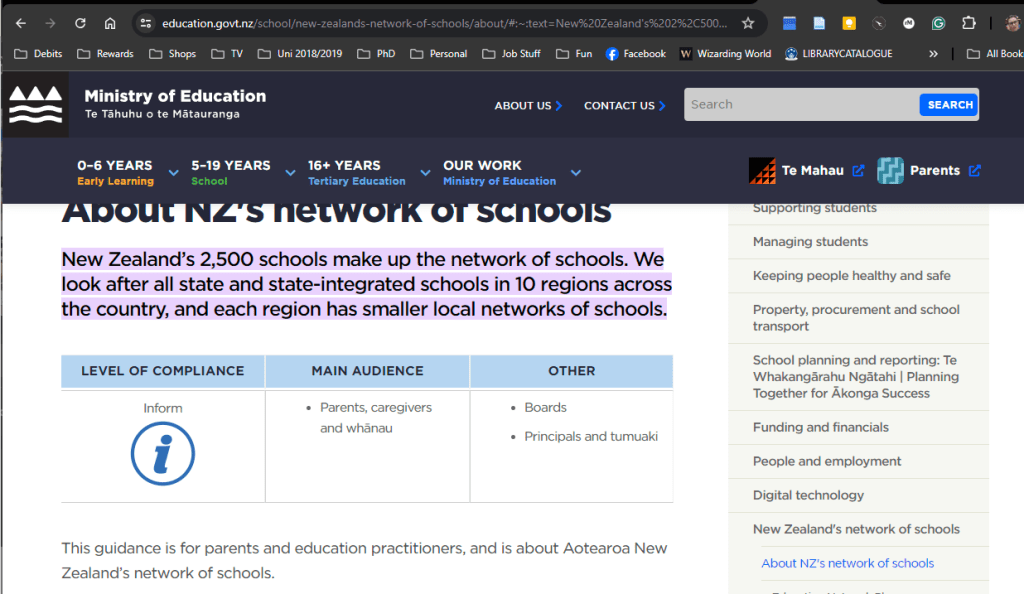
If I were to reference the information pictured in the image without changing the URL, the reference list item would look like this:
Ministry of Education. (2024, February 20). About NZ’s network of schools. Education in New Zealand. https://www.education.govt.nz/school/new-zealands-network-of-schools/about/#:~:text=New%20Zealand’s%202%2C500%20schools%20make,smaller%20local%20networks%20of%20schools.
The yellow highlight shows the extra information I am referring to. You can see that after the final point in the real URL, there is a # followed by :~:text=. This little piece of code forces the webpage you’re accessing to scroll to the location of the highlighted text. This feature of Chrome browsers is designed to make it easier for you to locate the answer to your search. However, these details are not necessary for inclusion in your reference list, AND they can turn relatively short links into longer, messier-looking ones.
To tidy this up, it’s simply a case of removing the details from the # onwards:
https://www.education.govt.nz/school/new-zealands-network-of-schools/about/
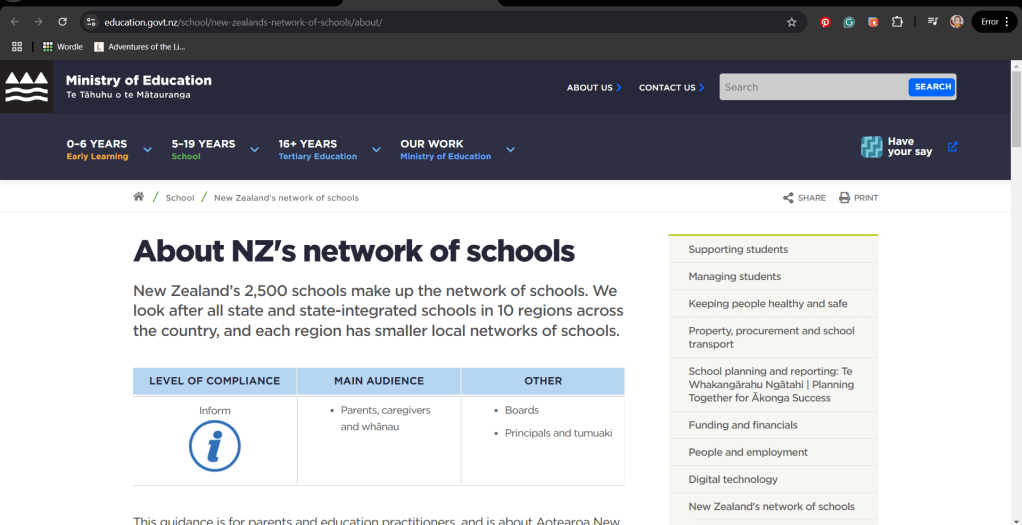
Not only will the link still work, it will remove the forced scroll if anyone chooses to access this webpage. It also provides a cleaner-looking reference item and improves the chance that the link will work if someone does want to check it:
Ministry of Education. (2024, February 20). About NZ’s network of schools. Education in New Zealand. https://www.education.govt.nz/school/new-zealands-network-of-schools/about/
This small but essential step is a great way to demonstrate that you are checking your individual reference list items for correct formatting. It also ensures that your complete list is reader-friendly and has the best chance of accessibility.
I promise this minor detail is worth doing!
*Note: This blog post has been proofread by Grammarly. I use this tool to check for grammatical and spelling errors. I do not use it to generate content.
**Header image taken by me.
 The Lifting Librarian
Hi Krystal,
Do you think it is permissible to use Bit.ly or other URL shortening services?
Cheers,
Alex
LikeLike
Hi Alex, the official APA Style Guide says the following about shortening URLS, “When a DOI or URL is long or complex, you may use shortDOIs or shortened URLs if desired” (APA Style, n.d., DOI and URL Shorteners, para. 1) https://apastyle.apa.org/style-grammar-guidelines/references/dois-urls
If wanting to use this in an assessment item, I would check with the SC to ensure they are ok with this, as it’s not a requirement, more a suggestion from the style. In terms of using this outside of assessment, I would think go with what you like! 🙂 K
LikeLike